The Ten of Diamonds
Security research, CTF writeups, and hacking adventures
Metasploitable 3
The Ten of Diamonds:
We go back to our meterpreter thanks to Elasticsearch and run a search:
meterpreter > pwd
C:\Program Files\elasticsearch-1.1.1
meterpreter > cd c:\
meterpreter > search
**[-]** You must specify a valid file glob to search for, e.g. >search -f \*.doc

```bash
meterpreter > pwd
C:\
meterpreter > search -f \*diamonds\*
Found 6 results...

```text
    C:\jack_of_diamonds.png
    C:\Program Files\OpenSSH\home\Public\Pictures\ten_of_diamonds.png (406134 bytes)

    **C:\Users\Public\Pictures\ten_of_diamonds.png** (406134 bytes)
    **C:\inetpub\wwwroot\six_of_diamonds.zip** (384916 bytes)
    C:\vagrant\resources\flags\six_of_diamonds.zip (384916 bytes)
    C:\vagrant\resources\flags\ten_of_diamonds.png (406134 bytes)

```bash
meterpreter >
if we start a shell and look at the     folder we can see it's a SYMLINK to C:\\Users


```bash
meterpreter > shell
Process 1 created.
Channel 2 created.
Microsoft Windows [Version 6.1.7601]
Copyright (c) 2009 Microsoft Corporation.  All rights reserved.

C:\Program Files\elasticsearch-1.1.1>cd\Program Files
cd\Program Files

C:\Program Files>cd OpenSSH
cd OpenSSH

C:\Program Files\OpenSSH>dir
dir
 Volume in drive C is Windows 2008R2
 Volume Serial Number is 1475-561C

 Directory of C:\Program Files\OpenSSH

11/25/2016  09:59 PM    <DIR>          .
11/25/2016  09:59 PM    <DIR>          ..
11/25/2016  09:59 PM    <DIR>          bin
11/25/2016  09:59 PM    <DIR>          docs
11/25/2016  09:59 PM    <DIR>          etc
11/25/2016  09:59 PM    <JUNCTION>     home [\??\C:\Users]
11/25/2016  09:59 PM                67 openssh.url
11/25/2016  09:59 PM    <JUNCTION>     tmp [\??\C:\Windows\Temp]
11/25/2016  09:59 PM           104,308 uninstall.exe
11/25/2016  09:59 PM    <DIR>          usr
11/25/2016  09:59 PM    <DIR>          var
               2 File(s)        104,375 bytes
               9 Dir(s)  47,950,204,928 bytes free

C:\Program Files\OpenSSH>
This means that the Ten of Diamonds can be also found by getting an SSH session on TCP port 22:
10.20.10.19 22 tcp ssh open OpenSSH 7.1 protocol 2.0
But I’m gonna stick with the meterpreter, it seems it has all I need to find cards for know.
OK, we know where the Ten of Diamonds is, let’s get it
meterpreter > ls
Listing: C:\Program Files\OpenSSH\home\Public\Pictures
======================================================

Mode              Size    Type  Last modified              Name
----              ----    ----  -------------              ----
40776/rwxrwxrw-   0       dir   2009-07-14 00:57:55 -0400  Sample Pictures
100776/rwxrwxrw-  480172  fil   2016-11-25 20:47:41 -0500  ace_of_hearts.jpg
100777/rwxrwxrwx  380     fil   2009-07-14 00:57:55 -0400  desktop.ini
100776/rwxrwxrw-  406134  fil   2016-11-25 20:47:42 -0500  ten_of_diamonds.png


```bash
meterpreter > pwd
C:\Program Files\OpenSSH\home\Public\Pictures


meterpreter > download ten_of_diamonds.png
[*] downloading: ten_of_diamonds.png -> ten_of_diamonds.png [*] skipped : ten_of_diamonds.png -> ten_of_diamonds.png
and look at that, we also found the Ace of Hearts, so we'll get it also


```bash
meterpreter > download ace_of_hearts.jpg
**[\*]** downloading: ace_of_hearts.jpg -> ace_of_hearts.jpg
**[\*]** download   : ace_of_hearts.jpg -> ace_of_hearts.jpg
OK, let’s see what Linux think of these files:
root@igor-kali:~# file ten_of_diamonds.png ace_of_hearts.jpg
ten_of_diamonds.png: data
ace_of_hearts.jpg:   JPEG image data, JFIF standard 1.01, resolution (DPI), density 96x96, segment length 16, baseline, precision 8, 342x500, frames 3
root@igor-kali:~#
Hmm.. something odd with that ten_of_diamonds.png, it should say PNG image etc… but instead it says just data
root@igor-kali:~# display ten_of_diamonds.png
display: improper image header \`ten_of_diamonds.png' @ error/png.c/ReadPNGImage/3930.
ImageMagick didn’t like it either, let’s take a closer look
Croot@igor-kali:~# binwalk ten_of_diamonds.png
DECIMAL       HEXADECIMAL     DESCRIPTION
--------------------------------------------------------------------------------
62            0x3E            Zlib compressed data, best compression
Ok, so binwalk can see the compressed data that we can usually find in a PNG file but not the PNG headers.
A normal PNG file will start something like this one (The Joker card)
root@igor-kali:~# hexdump -C  data.bin | head -10
00000000  89 50 4e 47 0d 0a 1a 0a  00 00 00 0d 49 48 44 52  |.PNG........IHDR|
00000010  00 00 02 09 00 00 02 d9  08 06 00 00 00 3d 5c b2  |.............=.|
00000020  d7 00 00 00 09 70 48 59  73 00 00 17 11 00 00 17  |.....pHYs.......|
00000030  11 01 ca 26 f3 3f 00 00  20 00 49 44 41 54 78 da  |...&.?.. .IDATx.|
00000040  ec bd 59 ac 6d d9 75 1d  36 d6 da cd 39 fb f4 b7  |..Y.m.u.6...9...|
00000050  7d ef be a6 1a 16 59 65  76 a2 15 59 2a 35 96 ac  |}.....Yev..Y\*5..|
00000060  40 51 e2 0f c7 04 12 21  00 03 04 d6 17 7f f4 61  |@Q.....!.......a|
00000070  7d 18 f9 d2 87 03 27 bf  01 81 c0 11 cc 2f 59 56  |}.....'....../YV|
00000080  24 21 a0 25 c8 89 13 38  08 0c 27 4e 24 53 4d 44  |$!.%...8..'N$SMD|
00000090  aa 28 16 ab 2f d6 ab d7  dd f6 9c 7b 9a dd af 95  |.(../......{....|
But the Ten of Diamonds starts like this instead:
root@igor-kali:~# hexdump -C ten_of_diamonds.png | head -10
00000000  89 4d 53 46 0d 0a 1a 0a  00 00 00 0d 49 48 44 52  |.MSF........IHDR|
00000010  00 00 02 09 00 00 02 d9  08 06 00 00 00 3d 5c b2  |.............=.|
00000020  d7 00 00 00 09 70 48 59  73 00 00 17 11 00 00 17  |.....pHYs.......|
00000030  11 01 ca 26 f3 3f 00 00  20 00 49 44 41 54 78 da  |...&.?.. .IDATx.|
00000040  ec bd 69 ac 6d 5b 76 1e  34 e6 9c ab dd dd d9 a7  |..i.m[v.4.......|
00000050  bd ed 7b f7 bd aa 72 55  dc 05 39 06 0a 90 82 0b  |..{...rU..9.....|
00000060  1c 8b 20 05 15 90 44 22  42 20 23 21 0b 11 a1 58  |.. ...D"B #!...X|
00000070  28 20 42 8c 14 cb 41 b4  42 f5 07 ac 58 08 2c 43  |( B...A.B...X.,C|
00000080  59 c2 29 70 1c 0b 82 88  64 47 18 6c d9 09 55 b6  |Y.)p....dG.l..U.|
00000090  cb 7e 55 e5 7a af 5e 7f  9b 73 ee 39 67 f7 7b 75  |.~U.z.^..s.9g.{u|

It says MSF instead of PNG, I doubt this is an email file, let's edit it and replace that MSF for a PNG


root@igor-kali:~# hexeditor ten_of_diamonds.png
Before:
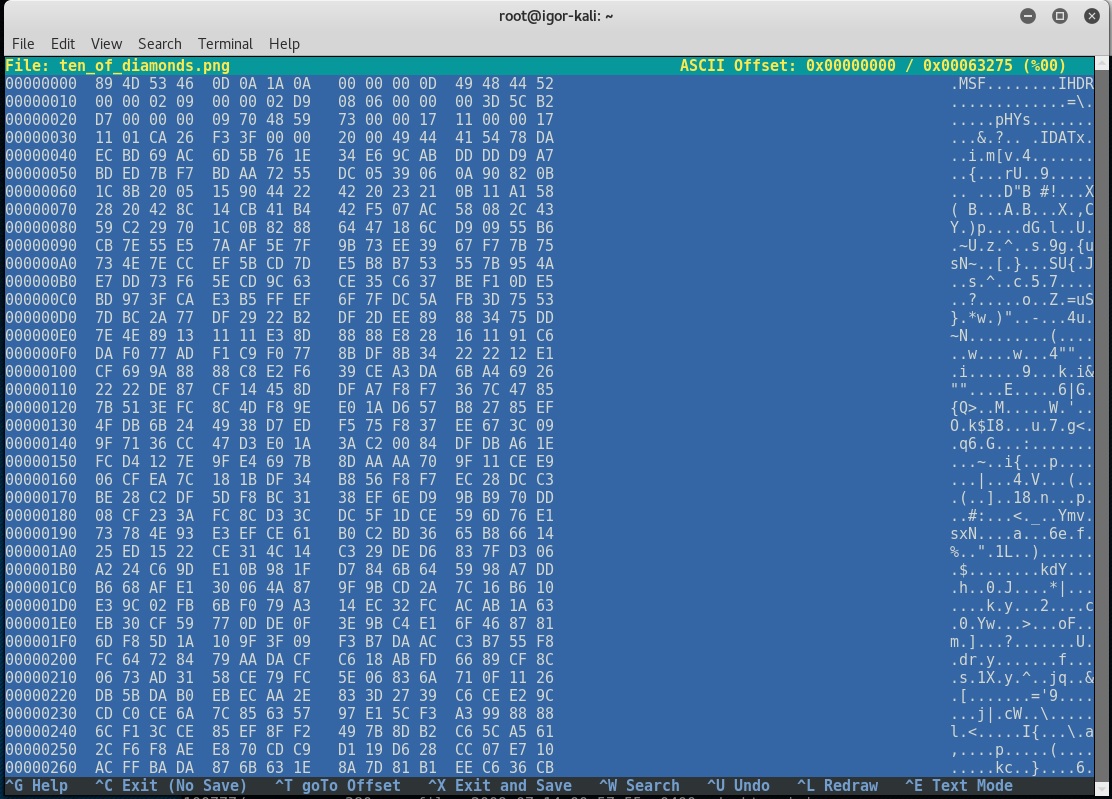
We open the manual for ascii to look for the HEX equivalent for P(0x50) N(0x4E) and G(0x47) so we replace M(0x4D) S(0x53) and F(0x46)
After
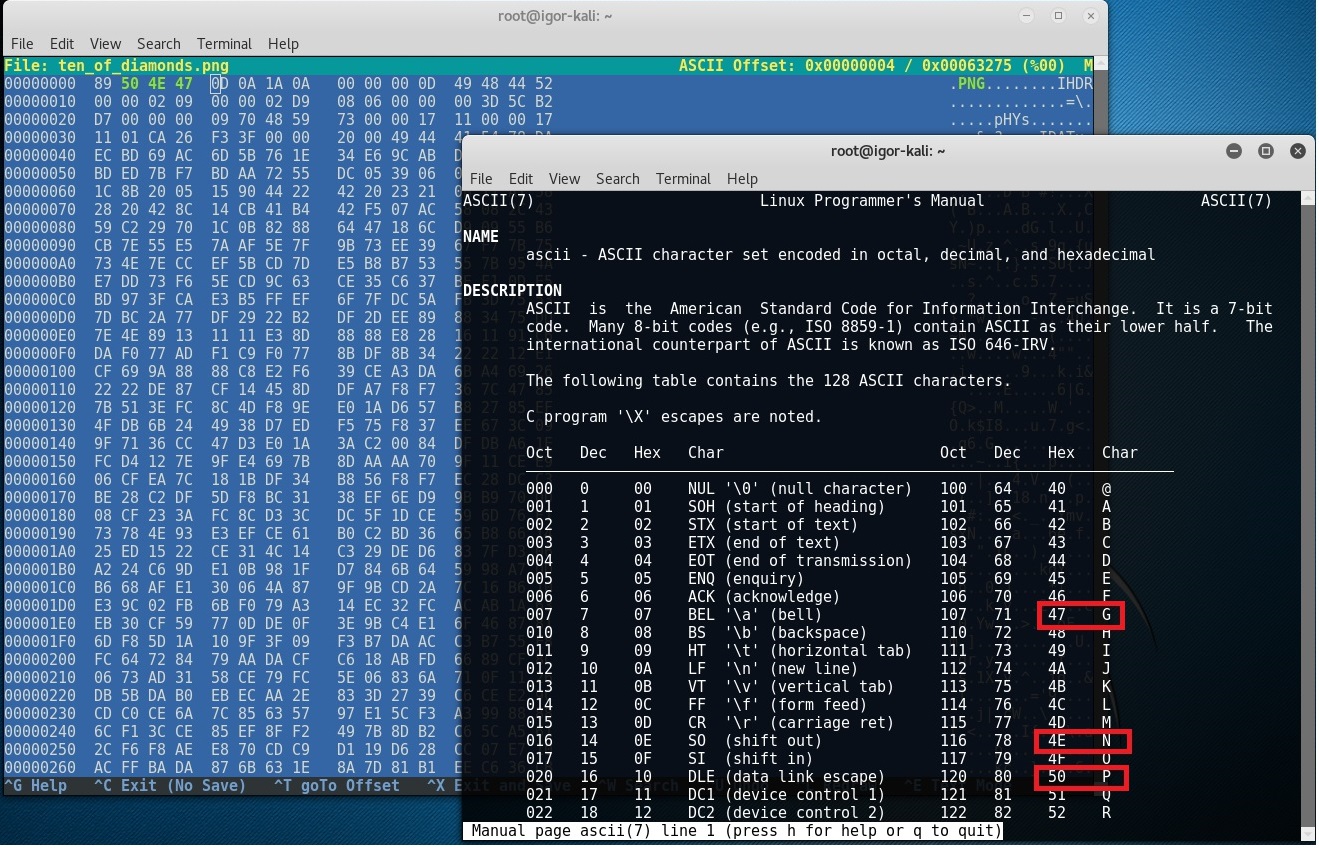
Ctrl+X to Save and we save it with another name in case we broke something :)
root@igor-kali:~# file ten_of_diamonds-PNG.png
ten_of_diamonds-PNG.png: PNG image data, 521 x 729, 8-bit/color RGBA, non-interlaced
That seemed to have worked, let’s take a look
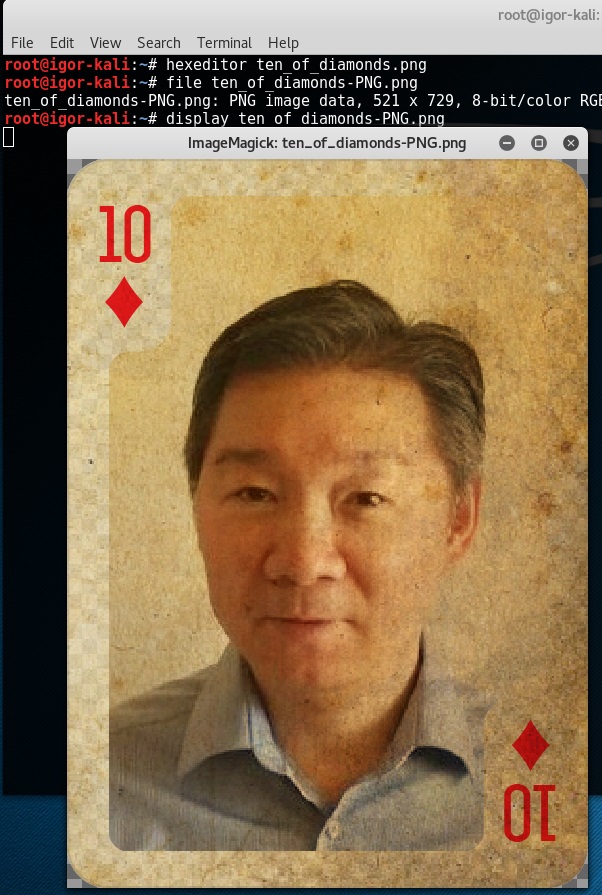
The Ten of Diamonds
← Back to all posts